
Transfer a vehicle when you sell it
The new owner gets the vehicle with its service history. Your payments stay with you.
- Open the vehicle, tap More (⋯), then Transfer ownership.
- Under Transfer to, type the new owner’s @username or email. They need a GarageApp account.
- Tap Transfer ownership and confirm with Transfer.

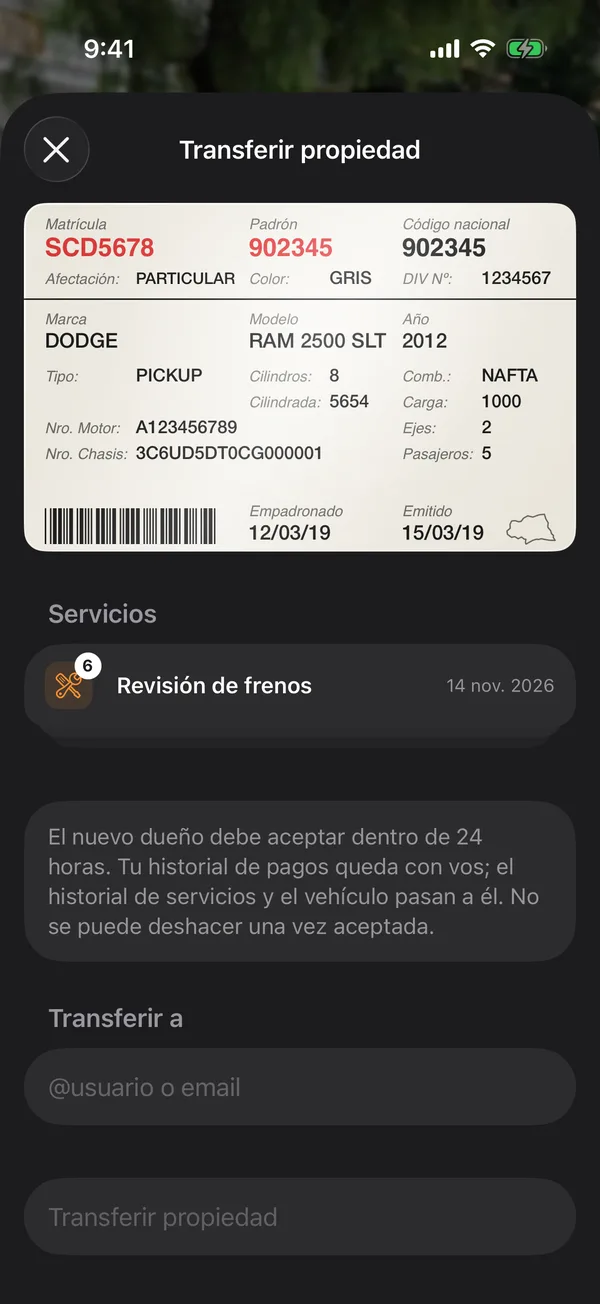
The app notifies the new owner. As the screen says: The new owner must accept within 24 hours. Your payment history stays with you; the service history and the vehicle move to them. Once accepted, it can’t be undone.
While you wait, the vehicle says Transferring and is still yours. If they don’t accept in time, nothing changes.
Cancel a transfer
On Transfer ownership, tap Cancel transfer and confirm. The vehicle stays yours and the recipient can no longer accept.
If the vehicle shares its insurance or monthly parking with others, the app asks you to remove it from that group before transferring it.
More in Transfers and selling
Didn’t find what you were looking for? Write to [email protected] and we’ll get back to you.